Join now for our best deal!

The Ultimate Parents Guide to Roblox’s Grow a Garden: Tips, Tricks, and Safety for Kids

posted on November 11 2025

If your child is playing Grow a Garden on Roblox, you might be wondering what it’s all about and, most importantly, if it’s safe. It’s one of the platform’s most popular creative games, letting kids design and nurture their own virtual garden in a calm, non-competitive space.

This guide has everything you need. We’ll cover how to play, share tips for building an amazing garden, and walk you through the simple safety settings that every parent should know.

Roblox’s Grow a Garden

What is Grow a Garden on Roblox?

Think of Grow a Garden as a modern, more colorful version of classic games like FarmVille. At its heart, it’s a relaxing farming simulator where the goal is simple and sweet: to cultivate a beautiful garden.

Players start with a small plot of land and get to:

  • Plant seeds of various flowers and plants.
  • Water their crops and watch them grow in real-time.
  • Harvest their plants to earn coins.
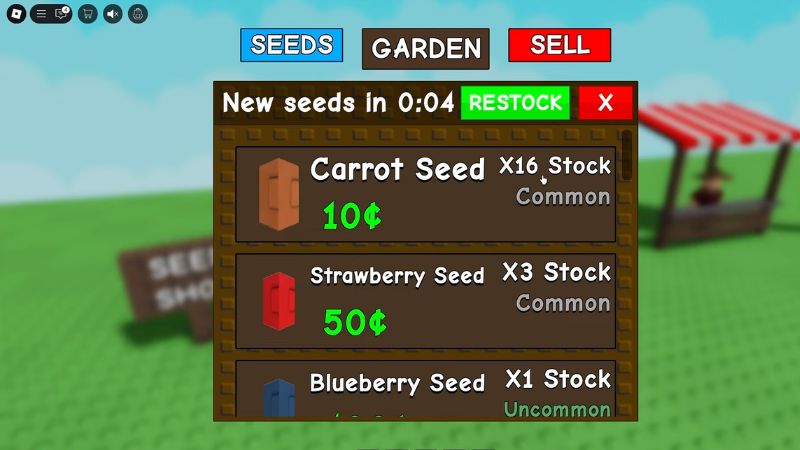
  • Use coins to buy new seeds, cute decorations, and expand their garden.

The game’s charm lies in its simplicity and creative freedom. There’s no fighting or intense competition, making it a perfect digital playground for younger kids who want a positive and imaginative experience.

A Parent’s Guide: Is Grow a Garden Safe for Kids?

This is the big question for any parent. The good news is that Grow a Garden is considered one of the safer games on the Roblox platform. However, like any online game, it’s wise to be aware of the features and know how to manage them.

In-Game Spending and Robux

The game is free to play, but there are options to buy special items—like rare seeds, fun decorations, or pets—using Robux, Roblox’s virtual currency that is purchased with real money.

Your Action Plan:

  • Set Spending Controls: Roblox has built-in parental controls. You can set a monthly spending limit or disable spending entirely so there are no surprise purchases.
  • Have a Conversation: Talk to your child about the difference between in-game items and real-world money.

Chat and Social Interaction

Grow a Garden is a social game. Kids can visit their friends’ gardens to see what they’ve created, which is a lovely feature. The game also includes a chat function.

Your Action Plan:

  • Customize Chat Settings: You have full control over the chat. In your child’s Roblox account settings (under “Privacy”), you can restrict interactions to just their approved friends or turn off chat completely. This is the single most effective way to ensure a safe social experience.

Our Verdict: Is it Kid-Friendly?

Yes. With its gentle theme and the ability to control spending and chat, Grow a Garden is a fantastic, kid-friendly choice on Roblox. It encourages creativity, patience, and planning in a peaceful environment.

How to Get Started in Grow a Garden: A Beginner’s Walkthrough

Ready to get planting? Here’s how your child can jump right in.

Step 1: Finding the Game: Open Roblox and use the search bar at the top to type “Grow a Garden.” Click on the game with the most visits to make sure it’s the official one.

Step 2: Your First Garden Plot: The game starts with a quick, hands-on tutorial. It will guide your child through planting their first seed, using the watering can, and harvesting their first flower. It’s super intuitive!

Step 3: Understanding Your Tools and Rewards: As your child harvests plants, they’ll see coins pop up. These coins can be used in the in-game shop to buy more seeds and fun items. Their basic tools, like the watering can and shovel, are always in their inventory, ready to use.

Roblox

Pro Tips to Level Up and Grow Your Garden Faster

Once your child has the basics down, they’ll want to expand their garden and unlock cool new items. Here are some practical tips to share with them!

Smart Planting Strategies

  • Plant in Batches: Don’t just plant one or two seeds at a time. Fill up as much of your garden as you can to get more coins and experience points (XP) with every harvest.
  • Start with Fast-Growing Seeds: In the beginning, use seeds that grow quickly. This helps you earn coins faster, which you can then use to buy more advanced seeds and tools.

Daily and Group Activities

  • Log in Every Day: The game gives out free rewards—like coins, boosts, or even rare seeds—just for logging in daily.
  • Complete Daily Challenges: Check the “Challenges” board for simple tasks. Completing them provides a great bonus.
  • Join the Official Group: If your child joins the developer’s Roblox group (you can find it on the game’s page), they’ll often get special in-game perks like extra luck or unique items.

Unlocking Rare Plants and Items

Half the fun is finding unique plants! You can get them by:

  • Using the in-game shop for special seeds.
  • Trading with trusted friends.
  • Checking for promo codes on the developer’s social media.
  • Getting lucky with daily rewards!

Beyond Farming: Customizing Your Dream Garden

Encourage your child to express themselves by customizing their space. The possibilities are endless!

Here are a few ideas to get them started:

  • Build charming fences and pathways to create different sections.
  • Add personality with garden gnomes, statues, and fountains.
  • Create a theme, like a spooky Halloween garden or a magical fairy garden.
  • Use different colored flowers to create beautiful patterns.

Common Mistakes for Beginners to Avoid

Help your little gardener thrive by avoiding these common slip-ups:

  • Spending Coins on Decor Too Early: It’s tempting to buy a cute gnome right away, but it’s smarter to use the first batch of coins to upgrade tools and buy more seeds. A bigger garden means more coins for decorating later!
  • Forgetting to Harvest: Plants won’t earn coins until they are collected. Make sure to log back in and harvest what you’ve grown.
  • Ignoring Boosts: Items like compost can speed up growth. Don’t forget to use them, especially on plants that take a long time to grow.

Grow a Garden vs. Other Roblox Farming Games

How does Grow a Garden stack up against other popular farming games on Roblox? Here’s a quick comparison:

Game Name Style Key Focus Best For…
Grow a Garden Casual & Creative Gardening and Decoration Beginners & relaxed play
Farming and Friends Realistic Simulation Crop management, vehicles Kids who like more complexity
Adopt Me! (Farming) Roleplay Pet care & simple farming Players who love pets first

Frequently Asked Questions (FAQ)

Q: Is Grow a Garden free to play? 

A: Yes, it’s completely free to play! Optional in-game purchases are available but not required to enjoy the game.

Q: Can I play Grow a Garden on mobile?

A: Absolutely. It works seamlessly on desktops, tablets, and mobile phones, so your child can tend to their garden anywhere.

Q: How do I get coins fast in Grow a Garden?

A: The best ways are to plant in large batches, complete your daily challenges, and log in every day to claim your free rewards.

Q: Are there promo codes for Grow a Garden?

A: Yes, the game developers sometimes release codes for free items. The best place to find them is by following the developer on social media or joining their official Roblox group.

Start Planting Your Adventure!

Grow a Garden is a canvas for creativity, a lesson in patience, and a safe, peaceful corner of the vast Roblox universe. With the right settings and a little know-how, it can be a wonderful digital activity for your child.

Looking for more ways to keep your family connected safely? The Justalk app offers secure video calls and messages, designed with your child’s safety as the top priority. Check it out today!

download